First WMS
WMS for a small warehouse: what to look for
A first WMS for a small warehouse should keep one stock number per item per location, guide receiving, putaway and picking, bring orders from every channel into one place and let you count without closing. Most warehouse software is described in terms of large operations: hundreds of dock doors, automation, and teams of analysts. If you have one building, a handful of staff and a few hundred to a few thousand locations, that language can make you feel you must buy more than you need.
You do not. This guide shows what a first system should do, what to leave out for now, and how to test a product with your own goods.
What "small" really changes
The core jobs are the same in a small warehouse. Stock comes in, gets put away, gets picked, packed and shipped, and gets counted. What changes is how many people can learn the tool and how much setup you can afford.
Three things matter more for you than for a big operation:
- Fast to learn. If staff need weeks of training, it will not stick. Look for something a new hire can use after a short session.
- Quick to set up. You do not have a project team. A system that needs months of configuration will stall.
- Predictable cost. A small business feels a price rise more. Know what the price is based on, and what happens as you grow.
The five things a first system must do
1. Know what you have and where
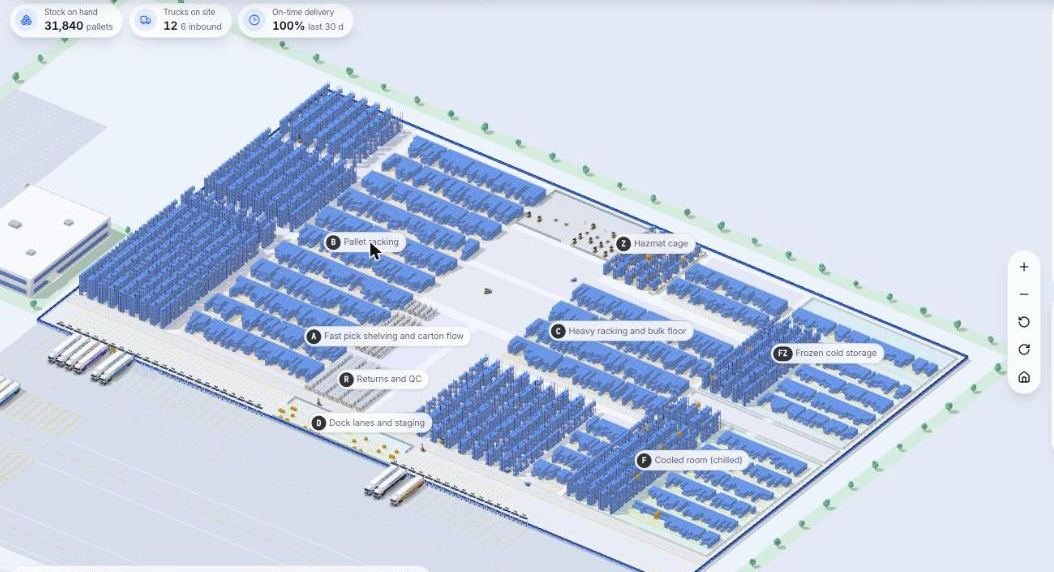
One stock number per item per location, updated when work happens. This is the main reason to buy.
If you have only ever seen your stock as rows in a sheet, this is the same idea drawn as a building. The next image is a screen from the Microsive demo platform, with demo data.
2. Guide receiving and putaway
Scan the delivery, check it against the order, and send the goods to a location. Accepting a mismatch should be a visible choice.
3. Guide picking
A pick list in a sensible walking order, scanned to confirm. Scanning catches many mispicks before the box is sealed.
4. Handle orders from where they come
Orders from your store, marketplace, phone or email should land in one place. Ask which connections are included.
5. Count without closing
A simple way to count a few locations a day and correct differences with a reason.
If a product does these five well, it is a candidate. Everything else is a bonus.
What to leave out for now
- Advanced slotting and optimisation. Useful at scale. At small scale, a sensible layout and good labels do most of the work.
- Automation and robotics. Not for you yet.
- Labour management and productivity scoring. Nice later. Do not pay for it now.
- Deep analytics. Start with a few reports you actually read.
- Multi-building features. Unless you have the second building.
Leaving these out keeps the cost and the learning curve down. Check that you can add them later without switching systems.
Three routes
Inventory tools with warehouse features. Often easy to start, but may lack scanning depth or location control. Test those two.
Subscription WMS. Built for warehouses, usually with scanning and many options. Check what the price is based on and where it steps up.
Custom build. Shaped to your process. Needs clear requirements and a budget set aside. Cargohold, which we make, is a one-time custom build, no per-seat, per-truck or per-client fees. Compare it to the routes above.
A test you can run
Before paying, try your own goods in the product. Ask for a trial or a guided demo and bring this script:
- Add ten of your real items with their units
- Create your location names for one aisle
- Receive a delivery with one item short
- Put the stock away
- Create two orders, one with an item that is out of stock
- Pick and pack both on a handheld or phone
- Run a count with a difference and adjust it
- Export the stock list
If you get stuck at any step, notice where. That is where your staff will get stuck too.
An example (hypothetical)
A small tools wholesaler keeps 800 items in one 6,000 square foot building, with three pickers. They list their five problems: stock numbers are wrong, wrong parts ship, receiving takes too long, the owner cannot see low stock, and two customers have asked for delivery tracking. They write the five musts above, add "label printing", and drop everything else. Three demos later, they have a clear favourite because only two of the three could finish the test script without help.
Questions to ask any vendor
- What is the price based on, and what happens when I add a user, a location or an order channel?
- How long does setup take for a business of my size?
- Which scanners and printers work with it?
- Can I import my item list from a spreadsheet?
- What do I get if I leave? Can I export my data in full?
- Who do I call when a shipment is stuck?
- What is not included that I will probably need?
Before you sign
Set a review date, 60 to 90 days after go-live, and write down the success measures: fewer wrong shipments, fewer counts that differ, faster receiving. If you cannot see a change by then, talk to the vendor with that evidence.
Questions people ask
What is the best WMS for a small warehouse?
The page does not rank products. It describes three routes, inventory tools with warehouse features, a subscription WMS and a custom build, and says to test any of them with your own goods before you pay.
What should a small warehouse WMS do?
Five things: keep one stock number per item per location, guide receiving and putaway, guide picking with scanning, bring orders from every channel into one place, and support counting a few locations a day.
What can a small warehouse leave out of a first WMS?
Advanced slotting, automation and robotics, labour management, deep analytics and multi-building features. Check that you can add them later without switching systems.
How do I test a WMS before buying?
Bring a script: add ten real items, create locations for one aisle, receive a delivery that is one item short, put away, create two orders including one out of stock, pick and pack both, run a count with a difference and export the stock list.
What questions should I ask a WMS vendor?
Ask what the price is based on and what happens as you grow, how long setup takes, which scanners and printers work, whether you can import from a spreadsheet, what you get if you leave, and what is not included.
How do I know the WMS worked?
Set a review date 60 to 90 days after go-live and write down the measures: fewer wrong shipments, fewer counts that differ and faster receiving.
Sources
- No third-party facts, prices or vendor claims are used on this page. Examples are hypothetical.